Website feedback tools are an essential component of maintaining and improving any online presence.
Website feedback involves collecting insights from users about their experiences and interactions with a website. This feedback can highlight what users like, what they dislike, and where there are opportunities for improvement. However, it’s crucial to remember that obtaining feedback shouldn’t burden your customers.
To gather meaningful insights, you must make the feedback process as seamless and straightforward as possible. Once feedback is received, the next challenge is to interpret and act on it efficiently. This is where the right website feedback tool can make a significant difference.
TL;DR
The best website feedback tools will help to collect user insights that improve user experience.
Different types of website and in-app feedback tools include feedback widgets, survey tools, and session replay tools.
Key benefits include enhanced user experience, increased conversion rates, and better product development.
Essential features of best type of feedback tools include ease of use, integration capabilities, and robust analytics.
Userback is the top way to collect website feedback visually with its advanced features and user-friendly interface.
What Are Website Feedback Tools?
Website feedback tools are digital solutions designed to help businesses gather, analyze, and act on user feedback about their website. These tools can capture user comments, ratings, suggestions, and other forms of feedback to provide valuable insights into user experience and website performance. They often include features like feedback widgets, surveys, session replays, and analytics to help businesses understand user behavior and identify areas for improvement.
Types of Website Feedback Tools
Website feedback tools come in various forms, each designed to capture different aspects of user experience and customer feedback. Understanding the different types of website feedback tools can help you choose the right solution for your specific needs.
Feedback Widgets
Feedback widgets are small, interactive elements embedded on a website that allow users to submit feedback directly. These widgets can appear as buttons, pop-ups, or side tabs and often support text comments, ratings, and visual annotations.
Survey Tools
Survey tools enable businesses to create and distribute surveys to collect detailed feedback from users. These surveys can be embedded on websites, sent via email, or shared through social media. They help gather structured feedback on specific topics or user experiences.
Session Replay Tools
Session replay tools capture and replay user interactions on a website. These tools record mouse movements, clicks, scrolls, and other actions to provide a visual representation of user behavior. This helps businesses identify usability issues and optimize the user experience.
Why Customer Feedback and Website Feedback Tools Matter
Understanding and responding to customer feedback is crucial for your ongoing business success. Website feedback tools facilitate the collection and analysis of user insights, enabling businesses to make data-driven decisions and improve their online presence. These tools help identify pain points, uncover user preferences, and prioritize development efforts based on actual user needs. The key benefits of using website feedback tools include:
Enhanced User Experience: Gain insights into user behavior and preferences to create a more intuitive and satisfying website experience.
Increased Conversion Rates: Identify and address barriers to conversion, optimizing the user journey to boost sales and engagement.
Data-Driven Decision Making: Use real feedback to inform your strategy, ensuring that changes and improvements are based on actual user needs and behaviors.
Continuous Improvement:Regularly gather feedback to keep your website up-to-date with user expectations and industry standards.
Efficient Issue Resolution: Quickly identify and resolve issues, minimizing user frustration and maintaining a positive brand reputation.
By leveraging website feedback from your customers, businesses can stay attuned to their users’ needs, leading to greater satisfaction, loyalty, and ultimately, success.
Essential Features to Choose a Website Feedback Tool
Website feedback tools not only simplify the feedback collection process but also provide robust functionalities that enhance analysis and integration. In this section, we’ll explore the key features to look for in top website feedback tools, ensuring you choose a solution that aligns with your goals and supports your team’s needs for actionable insights.
Ease of Use: User-friendly interfaces for both users and administrators.
Integration Capabilities: Seamless integration with other tools and platforms.
Customizable Widgets and Surveys: Tailor how you collect feedback from customers, as well as client feedback to best suit your specific needs.
Visual Feedback Options: Annotated screenshots and video feedback for clear insights.
Advanced Analytics: Detailed reporting and analytics to interpret feedback.
Real-Time Feedback: Immediately collect feedback from website visitors and app users and receive instant notifications.
Automated Workflows: Automate how you collect feedback from your customers and management it efficiently.
Multichannel Feedback: Collect feedback from various channels (web, mobile, email).
Secure and Compliant: Ensure data security and compliance with regulations.
Best Website Feedback Tools in 2026
Choosing the right website feedback tool for your needs is crucial for effectively gathering, analyzing, and acting on user insights. With an array of options available, each offering unique features and benefits, it can be challenging to find the perfect fit for your needs.
In this section, we’ve compiled a list of the top website feedback tools for 2026, categorized into feedback widgets, survey tools, and session replay tools. Whether you’re a product manager or a SaaS founder, these tools will help you streamline feedback collection and enhance your website’s user experience.
Feedback Widgets
01. Userback
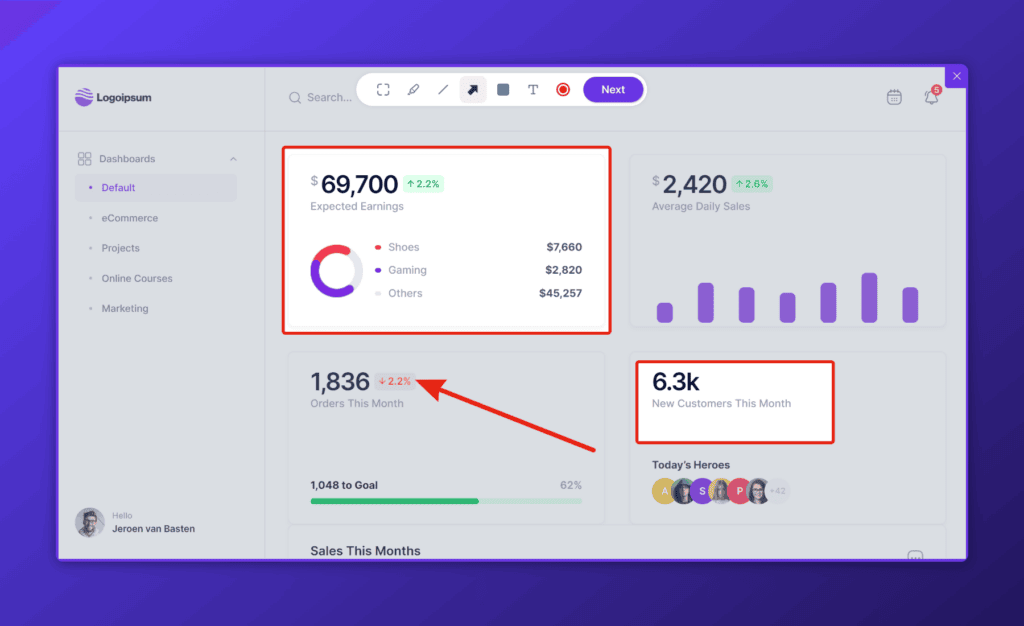
Userback is a powerful visual feedback tool that allows users to leave visual feedback directly on websites with annotated screenshots, making it easy for businesses to understand and act on feedback.
Best For: Product managers and SaaS founders looking for comprehensive visual website feedback software with targeted website feedback surveys and customizable feedback forms.
What We Like Most: Its intuitive interface and powerful visual feedback capabilities make it the top choice for collecting website and product feedback data that is easy to understand and faster to action.
Hotjar combines analytics and customer feedback tools to understand user behavior and gather feedback through heatmaps, recordings, and surveys to help you collect and analyze website feedback.
Key Features:
Heatmaps and session recordings
Feedback polls and surveys
Conversion funnels
Form analytics
Integration with popular analytics and bug tracking tools
Best For: Businesses needing to collect feedback from their website visitors whilst also capturing behavioral analytics.
What We Like Most: The comprehensive suite of customer feedback tools that help with both behavioral analytics and customer feedback.
03. Qualaroo
Qualaroo offers targeted surveys and NPS tools to gather qualitative insights from users.
Key Features:
Targeted survey pop-ups
NPS and customer satisfaction surveys
Sentiment analysis
Integration with analytics and marketing tools
Best For: Businesses focused on gathering qualitative insights through targeted surveys.
What We Like Most: The advanced targeting and sentiment analysis features.
04. Survicate
Survicate provides customizable website feedback surveys to collect user feedback and analyze responses.
Key Features:
Website surveys and feedback widgets
NPS and customer satisfaction surveys
Survey templates
Integration with marketing and CRM tools
Best For: Companies looking for versatile website survey and feedback software.
What We Like Most: The wide range of survey templates and integration options.
05. UserVoice
UserVoice integrates customer support, feedback management, and knowledge base tools to gather and prioritize user feedback.
Key Features:
Feedback forums and suggestion boards
Customer support ticketing
NPS surveys
Knowledge base integration
Best For: Businesses needing a combined feedback and customer support solution.
What We Like Most: The integrated approach to combine a feedback platform with customer support.
06. Feedier
Feedier gamifies feedback collection with customizable surveys and rewards for increased user engagement.
Key Features:
Gamified surveys with rewards
Feedback widgets and forms
Detailed analytics
Integration with CRM and marketing tools
Best For: Companies aiming to increase engagement with gamified feedback requests.
What We Like Most: The unique approach to help you collect feedback through gamification.
07. GetFeedback
GetFeedback captures customer feedback through responsive surveys and integrates with Salesforce for CRM integration.
Key Features:
Mobile-friendly surveys
Salesforce integration
NPS and customer satisfaction surveys
Real-time feedback analytics
Best For: Businesses using Salesforce seeking seamless feedback integration.
What We Like Most: The robust integration with Salesforce for streamlined and contextual feedback management.
08. Wootric
Wootric focuses on Net Promoter Score (NPS) surveys to measure customer satisfaction and loyalty.
Key Features:
NPS surveys
Customer satisfaction surveys
Real-time analytics
Integration with CRM and customer support tools
Best For: Companies prioritizing NPS for measuring customer loyalty.
What We Like Most: The focus on NPS and its detailed analytics.
09. Feedbackify
Feedbackify provides customizable feedback forms and widgets for collecting customer feedback directly on websites.
Key Features:
Customizable feedback forms
Real-time feedback reporting
Analytics dashboard
Easy website integration
Best For: Small to medium-sized businesses looking for straightforward feedback solutions.
What We Like Most: The simplicity and ease of integration.
Survey Tools
10. SurveyMonkey
SurveyMonkey is a popular online survey tool for creating and analyzing surveys to gather customer feedback.
Key Features:
Customizable survey templates
Real-time results and analytics
Survey logic and branching
Integration with various apps and tools
Best For: Businesses of all sizes needing a versatile website feedback tool.
What We Like Most: The extensive customization options and robust analytics.
11. Typeform
Typeform creates engaging surveys and forms with a conversational interface to collect qualitative data.
Key Features:
Conversational survey design
Customizable templates
Integration with popular tools
Real-time responses and analytics
Best For: Companies looking to create engaging and user-friendly surveys.
What We Like Most: The unique conversational interface that enhances user engagement.
12. Google Forms
Google Forms is a free tool by Google for creating surveys and forms, with basic analytics and integration capabilities.
Key Features:
Easy-to-use form builder
Integration with Google Sheets
Basic analytics and reporting
Free to use
Best For: Individuals and small businesses needing a simple and free website feedback tool.
What We Like Most: The seamless integration with Google Workspace and zero cost.
13. Formstack
Formstack allows creation of customizable forms and surveys with advanced reporting and integration options.
Key Features:
Drag-and-drop form builder
Customizable templates
Advanced reporting and analytics
Integration with CRM and marketing tools
Best For: Medium to large businesses needing advanced form and survey features.
What We Like Most: The powerful customization and integration capabilities.
14. Zoho Survey
Zoho Survey provides survey creation, distribution, and analysis tools with integration capabilities.
Key Features:
Customizable survey templates
Multichannel survey distribution
Advanced analytics and reporting
Integration with Zoho suite and other tools
Best For: Businesses using Zoho products looking for seamless survey integration.
What We Like Most: The compatibility with Zoho suite and comprehensive analytics.
15. Alchemer
Alchemer offers advanced survey and data collection features with customizable reporting and analytics.
Key Features:
Advanced survey logic and branching
Customizable reporting
Integration with various tools
Real-time data collection
Best For: Enterprises needing sophisticated survey features and analytics.
What We Like Most: The extensive customization and advanced data collection options.
16. Qualtrics
Qualtrics is an enterprise-grade survey software with powerful analytics and automation tools to comprehensively collect feedback.
Key Features:
Advanced survey logic and branching
Powerful analytics and reporting
Automated workflows
Integration with CRM and other tools
Best For: Large enterprises needing a comprehensive website feedback platform for users to leave feedback.
What We Like Most: The robust analytics and automation features.
17. SogoSurvey
SogoSurvey provides versatile survey creation and distribution tools with advanced reporting and data analysis capabilities.
Key Features:
Customizable survey templates
Multichannel survey distribution
Advanced reporting and analytics
Integration with CRM and marketing tools
Best For: Businesses of all sizes looking for flexible survey solutions.
What We Like Most: The versatile survey distribution options and detailed analytics.
18. AskNicely
AskNicely focuses on NPS surveys and customer feedback management to improve customer satisfaction and retention.
Key Features:
NPS and customer satisfaction surveys to collect feedback in real-time
Integration with CRM and support tools
Detailed analytics and reporting
Best For: Companies prioritizing NPS and customer feedback for retention strategies.
What We Like Most: The focus on NPS and real-time feedback capabilities.
19. CrowdSignal
CrowdSignal offers survey creation and polling tools with easy embedding options for websites and blogs.
Key Features:
Customizable survey and poll templates
Easy website embedding
Real-time analytics
Integration with WordPress and other platforms
Best For: Bloggers and small businesses needing simple survey and polling tools.
What We Like Most: The ease of embedding surveys and polls into websites and blogs.
Session Replay Tools
20. FullStory
FullStory captures user interactions on websites and provides playback of sessions to understand user behavior.
Key Features:
Session replay
Heatmaps and scroll maps
Conversion funnels
Detailed analytics
Integration with various tools
Best For: Businesses that need to choose a website feedback tool that enables detailed insights into website visitors and user behavior.
What We Like Most: The comprehensive session replay and heatmap features.
21. Inspectlet
Inspectlet records user sessions and provides heatmaps and form analytics for UX optimization.
Key Features:
Session replay
Heatmaps and click maps
Form analytics
Funnel analysis
Best For: Companies looking to optimize user experience through detailed session recordings.
What We Like Most: The detailed form analytics and heatmap features.
22. Mouseflow
Mouseflow tracks website visitors with session replay, heatmaps, and conversion funnels to optimize UX.
Key Features:
Session replay
Heatmaps and scroll maps
Conversion funnels
Feedback widgets
Integration with analytics tools
Best For: Businesses aiming to improve UX with detailed user behavior insights.
What We Like Most: The combination of session replay and conversion funnels for comprehensive UX analysis.
23. Smartlook
Mouseflow tracks website visitors with session replay, heatmaps, and conversion funnels to optimize UX.
Key Features:
Session replay
Heatmaps and scroll maps
Conversion funnels
Feedback widgets
Integration with analytics tools
Best For: Businesses aiming to improve UX with detailed user behavior insights.
What We Like Most: The combination of session replay and conversion funnels for comprehensive UX analysis.
24. Crazy Egg
Crazy Egg offers heatmaps, scroll maps, and A/B testing tools to analyze user behavior and optimize conversions.
Key Features:
Heatmaps and scroll maps
A/B testing
User recordings
Real-time analytics
Integration with various tools
Best For: Businesses looking to use a website feedback tool with a focus on conversion rate optimization.
What We Like Most: The combination of heatmaps, scroll maps, and A/B testing for comprehensive optimization.
25. Glassbox
Glassbox provides session replay, heatmaps, and conversion funnels to optimize website usability and performance.
Key Features:
Session replay
Heatmaps and click maps
Conversion funnels
Form analytics
Best For: Companies looking to improve website experience and usability through detailed user behavior analysis.
What We Like Most: The combination of session replay and conversion funnels for in-depth usability analysis.
26. Lucky Orange
Lucky Orange combines session replay with heatmap and live chat tools for real-time user engagement and analysis.
Key Features:
Session replay
Heatmaps and click maps
Live chat and visitor polls
Conversion funnels
Integration with various tools
Best For: Businesses looking for real-time user engagement and behavior analysis.
What We Like Most: The integration of live chat with session replay and heatmaps for comprehensive user engagement.
27. Contentsquare
Contentsquare offers advanced session replay and heatmap analytics to understand user behavior and improve UX/UI design.
Key Features:
Session replay
Heatmaps and click maps
User journey analysis
Conversion funnels
Best For: Enterprises needing advanced UX/UI design optimization tools.
What We Like Most: The advanced session replay and user journey analysis features.
Why Choose Userback as your Website Feedback Tool
Userback helps product teams collect, understand, and act on feedback with speed and clarity through its powerful website feedback software. Here’s what makes Userback a perfect choice for your website feedback tool in 2026:
1. Collect website feedback
Userback offers customizable feedback widgets that allow users to provide visual feedback directly on your website. Users can highlight specific areas, annotate screenshots, and even record their screens to give detailed insights into their experiences.
2. Easily understand it
Along with visual feedback capture, Userback automatically appends the user’s metadata and even a session recording, giving you all the information you need to easily understand and interpret the feedback. With this additional context, you can quickly identify trends, categorize feedback, and prioritize issues based on their impact.
3. Collect website feedback
Integration with popular project management tools ensures that feedback management is seamlessly incorporated into your workflows. You can assign feedback to team members, track progress, and ensure that issues are resolved efficiently.
Userback’s comprehensive features make it an invaluable website feedback tool for product managers and SaaS founders who want to maintain a user-centric approach and continuously improve their websites based on user feedback. See for yourself by signing up for a free 14-day trial.
Start free with Userback today!
Discover why Userback is the #1 website feedback tool.