
Best Web Application Testing Tools: A Comprehensive Guide

As web applications grow to be more sophisticated, so does the need for reliable and efficient testing. Web application testing tools are essential for verifying functionality and performance. As we look to the future, these tools are expected to undergo substantial advancements, mirroring industry trends towards automation, cloud integration, and user-focused designs.
Understanding the evolution of web app testing tools is crucial for developers and QA professionals seeking to keep pace with technological advancements. Key features like automation, scalability, and AI-driven insights are becoming standard expectations. With options ranging from Selenium’s cross-browser capabilities to Katalon’s low-code simplicity, choosing the right tools requires strategic consideration.
This guide delves into the top web application testing tools, exploring their features, trends, and integration capabilities. It also examines selection criteria, including cost-effectiveness and community support, to aid in making informed decisions. Whether you’re leveraging automated solutions or cloud technology, this comprehensive guide provides insights into the tools shaping the future of web application testing.
TLDR;
- Web app testing is evolving fast—think automation, AI, and low-code tools.
- Key features to look for include automation, cross-browser support, real-time feedback, CI/CD integration, and scalability.
- Top tools include Selenium, Cypress, Playwright, Katalon, BrowserStack, and more.
- Low-code/no-code options like BugBug and Testsigma are making testing more accessible.
- Cloud platforms and AI-driven tools speed up and scale the testing process.
- Combine manual and automated testing for best results.
- Don’t forget real user feedback—tools like Userback help teams catch issues early and improve user experience.
Evolution of Web Application Testing Tools
Web application testing tools have greatly evolved to address a spectrum of scenarios, ranging from basic web protocols to intricate enterprise solutions. These tools ensure applications are resilient against real-world usage. Continuous load and performance testing are key capabilities, verifying an app’s stability under varied traffic.
The growth of automated testing platforms has markedly reduced testing time. Automating repetitive tasks enhances testing efficiency and streamlines processes. Importantly, these tools uncover bugs and vulnerabilities early, saving both time and resources later in development.
Many modern testing tools seamlessly integrate with defect tracking systems. This enables effective collaboration between development and QA teams by streamlining bug identification and resolution.
Key Features to Look for in Testing Tools for Web Applications
When selecting web application testing tools, focusing on key features can significantly boost software quality and team efficiency. Modern testing tools now integrate AI and ML capabilities, enhancing both testing efficiency and accuracy. This technological advancement is crucial for automating repetitive tasks, effectively saving time and resources.
Essential features to look for include speed, accuracy, and scalability, ensuring your web applications are reliable and deployment-ready. A combination of code-based and low-code testing approaches empowers developers and technical testers to handle complex test cases seamlessly.
Here’s a brief list of key features to prioritize in testing tools:
- Automated Testing: Reduces manual effort and accelerates the testing process.
- Cross-Browser Testing: Ensures functionality across different real browsers and mobile devices.
- Real-Time User Interactions: Captures real-time feedback and interaction data.
- Parallel Test Execution: Allows for simultaneous testing across various platforms.
- Seamless Integration: Integrates with existing workflows for continuous testing.
Utilizing these advanced features in the right combination guarantees a robust, data-driven testing process suited for modern web applications.
See Userback In Action
Discover how Userback helps you collect, manage, and act on user feedback with ease.
Automated Testing Tools
Automated testing tools are fundamental in the modern software development life cycle. Designed to simulate user interactions, these tools enhance the speed, efficiency, and coverage of testing processes. By automating repetitive tasks, they save time, reduce cost, and minimize human error. Key benefits include improved software quality and a substantial return on investment. Integration of automated testing in CI/CD pipelines ensures early bug detection, leading to more stable applications and a seamless user experience. Open-source testing tools further benefit development teams with flexibility and community support, ideal for Agile environments. These tools often come equipped with AI and ML capabilities to optimize and elevate testing outcomes.
Selenium: Cross-Browser Testing Leader
Selenium remains an indispensable tool for web application testing, valued for its versatility and broad browser support. As an open-source framework, it offers developers the ability to automate tests across various browsers and operating systems. It supports multiple programming languages such as Java, Python, and C#, providing flexibility to diverse development teams. While Selenium excels in feature-rich environments, crafting complex scripts demands advanced programming skills. The tool’s extensive integration capabilities through plugins and extensions allow teams to tailor its use to their specific needs, solidifying its status as a leader in cross-browser testing.
Cypress: The Fast, Reliable Tester
Cypress stands out as a modern JavaScript framework tailored for end-to-end testing of web applications. Its streamlined setup bypasses the need for Java or Selenium, making it user-friendly for developers. One of Cypress’s standout features is its integration with Chrome DevTools, offering a robust debugging experience. This capability enhances the visibility of application behavior in real-time, making bug identification straightforward. Cypress supports testing on multiple browsers, including Chrome, Firefox, and Edge. Real-time reloading and automatic screenshot capturing during tests significantly aid in quickly pinpointing and resolving issues, positioning Cypress as a reliable choice for rapid testing cycles.
Playwright: Comprehensive Automation Testing Tool
Playwright, developed by Microsoft, is a comprehensive test automation tool and framework tailored for web browsers. It provides robust cross-browser support for Chromium, Firefox, and WebKit, ensuring consistent testing across different environments. Playwright simulates real user interactions using the actual browser input pipeline, managing complex actions such as hovering and dynamic control interactions. Its core capability of running tests out-of-process allows full test isolation across multiple tabs and users, enhancing test reliability. Advanced features like automatic waiting, network interception, and multi-context management enable the creation of highly reliable end-to-end tests, cementing Playwright’s reputation as a powerful tool for comprehensive web application testing.
Ready to start web application testing?
Try Userback’s visual feedback tools to execute testing with your team and users. Capture feedback and bugs with automatic screenshots, session replays, and console logs and analyze results.
Low-Code and No-Code Testing Options
Low-code and no-code testing tools revolutionize the way tests are designed by making them accessible to users without programming expertise. These tools typically operate as record-and-playback systems, transforming user interactions into automated test steps. This approach simplifies the testing process while maintaining comprehensive coverage. Testsigma and BugBug are examples of tools that employ low-code techniques, enabling users to automate web application tests using simple English commands or end-to-end regression testing features. These solutions significantly speed up the testing process and facilitate early detection of performance issues.
Zoho QEngine combines flexibility with its no-code, low-code, and pro-code options, boasting advanced features like AI-driven self-healing and parallel testing. This layered approach ensures that even users without technical skills can effectively contribute to the testing process. Similarly, Ranorex offers low-code automation with a focus on test recording and case management, allowing for further customization using programming languages like C# and VB.NET. These platforms remove complexities, streamlining testing workflows and maximizing collaboration across teams through intuitive and user-friendly interfaces.
Katalon: Simplicity in Complex Testing
Katalon Studio stands out as a versatile test automation platform due to its no-code, low-code, and code-based environment. It simplifies complex testing through an intuitive record-and-playback feature, which testers can customize in Scripting mode. This flexibility allows testing across various environments, including web, mobile, API, and desktop applications, eliminating the need for extensive infrastructure maintenance.
Katalon’s integration capabilities are robust, supporting collaboration tools and CI/CD platforms like Slack, Microsoft Teams, and Jira. This feature enhances team communication and maintains project transparency. Test execution is versatile, occurring locally, through the CLI, or in the cloud, offering combinations of browsers, devices, and operating systems. Post-execution, comprehensive test reports furnish users with vital metrics to make data-driven decisions efficiently and adjust testing processes accordingly.
Tricentis Tosca: Rapid Bug Detection
Tricentis Tosca provides an enterprise-level testing solution designed to meet the needs of Agile and DevOps teams aiming for continuous testing and quick bug detection. Its codeless, model-based approach leverages advanced AI with a focus on enhancing automated testing efficiency. By concentrating on dynamic interactions, Tosca ensures that web application defects are quickly and accurately identified and addressed.
This tool extends its capabilities to cater to end-to-end testing across multiple platforms, increasing the speed and precision of bug detection. Tosca supports a wide range of applications, offering robust test analysis and cross-application compatibility while operating as a licensed tool. Although it primarily supports Windows environments, its comprehensive features make it invaluable for enterprises looking to integrate rapid bug detection into their testing processes seamlessly.
Integration with Cloud Services
Cloud-based testing tools have become essential for modern web application testing, offering enhanced capabilities like automated tests, seamless integration, and cost-efficiency. Tools like CloudQA and LambdaTest exemplify this shift by utilizing cloud infrastructure to support web app scalability and functionality. CloudQA, utilizing Selenium, focuses on streamlining enterprise testing with cloud-based resources, while LambdaTest excels in cross-platform testing across over 2000 real browsers and devices. Additionally, integrating cloud security tools ensures web apps are fortified against vulnerabilities, further bolstering the testing process. As web applications grow in complexity, selecting appropriate cloud-based testing solutions is critical to improving release quality and speed.
Leapwork: Scalable Testing Environments
Leapwork is a cutting-edge AI-powered platform designed for building scalable automation processes within diverse testing environments. Catering to varied user interactions and numerous technologies, Leapwork simplifies web test automation with its no-code Smart Recorder. This intuitive interface enables users to effortlessly create automated tests, reducing the need for programming languages. Leapwork’s Intelligent Field Recognition adapts to UI changes, providing test stability and freeing testers from repetitive tasks. The platform also offers modular automation through smart building blocks, allowing for efficient integration and maintenance of automated test processes. This makes Leapwork an ideal choice for scaling testing environments in mobile applications and web apps.
BrowserStack: Cloud-Based Testing Efficiency
BrowserStack provides a robust cloud-based platform for testing web applications on real devices and browsers, ensuring consistently accurate results. Its seamless integration with CI/CD tools enhances the testing process by facilitating automated testing within development workflows. With capabilities for parallel test execution, BrowserStack allows companies to run extensive test volumes, like executing 650 tests within hours, optimizing time and resources. The platform supports over 50,000 global customers, enabling them to deliver seamless web experiences. An outstanding example of its efficiency is demonstrated by Nykaa, which achieves significant time savings by conducting 20,000 tests in just a few hours through BrowserStack’s parallel processing capabilities.
Trends in Web App and Website Testing Tool Development
The development of web application testing tools is rapidly advancing, driven by technological innovation and the evolving demands of QA testers and development teams. The integration of AI and machine learning into these tools is a notable trend, automating test case generation and optimizing test execution processes. This advancement not only addresses existing challenges but also enhances the capability of testers to ensure software stability and quality.
Automated testing tools are becoming essential in development workflows due to their efficiency in handling repetitive tasks, which maintains software stability throughout the lifecycle. Popular automation tools such as Selenium and Cypress exemplify reliability across various programming environments. Furthermore, the integration of testing tools with CI/CD pipelines enhances deployment efficiency and ensures that operational testing is consistent. As testing tools evolve, they aim to seamlessly incorporate advanced features to improve testing processes, cross-browser testing on real devices, and provide intuitive interfaces for users.
AI-Driven Testing Insights
AI-driven testing tools, such as Testlio, are revolutionizing software testing by combining automated and manual methods, ensuring high-quality results and efficient device management. These modern tools integrate AI and ML capabilities to automate test case generation, predict defects, and optimize testing strategies, ultimately reducing the manual effort required by testers. Testsigma showcases AI-driven advancements by using Gen-AI to conduct codeless web app test automation, creating tests through prompts and user stories.
The role of AI in testing tools significantly accelerates automated testing workflows, allowing for streamlined processes and increased efficiency. By leveraging these tools, companies can achieve significant improvements in testing coverage. Testsigma, for example, reports a 70% enhancement in test coverage due to effective AI-driven practices. This level of efficiency and accuracy demonstrates the profound impact AI integration has on the future of web application testing.
Fusion of Manual and Automated Testing
The fusion of manual and automated testing combines the speed and efficiency of automation with the intuition and adaptability of manual testing, elevating overall software quality. Automated tools efficiently simulate user interactions and validate functionality, which complements manual testing that focuses on exploratory or complex scenarios unique to human intervention. This strategic fusion enables a broader range of scenarios to be covered, as repetitive tasks are automated while nuanced human judgment is retained for unique cases.
Utilizing both automated and manual testing methods ensures comprehensive test coverage and helps in detecting issues across varied operating environments. A well-integrated testing strategy that incorporates both approaches maintains high levels of test effectiveness throughout different software development stages. The balance between automation and human insight achieves a cohesive testing environment, essential for delivering robust and reliable applications.
Continuous Testing Frameworks
Continuous testing frameworks are a critical component in modern development workflows, seamlessly integrating with CI/CD pipelines to align testing with rapid development cycles. These frameworks are progressively leaning towards codeless test automation, making them more accessible to non-technical team members and promoting collaboration. Contemporary testing tools now offer advanced plugins and integrations with popular CI/CD platforms like Jenkins, GitLab CI, and Travis CI, which streamline automated testing processes.
These frameworks often feature cross-browser testing capabilities without needing additional browser plugins, supporting tests on a range of systems including Windows, macOS, and Linux. This flexibility is paired with intuitive interfaces, comprehensive documentation, and active community support, facilitating swift adoption of testing practices by new users. Continuous testing frameworks are pivotal in maintaining consistent testing standards, ensuring that web applications perform optimally across various environments and devices.
Selection Criteria for Web Testing Tools
Choosing the right web application testing tool can greatly enhance your testing strategy. It’s crucial to select tools that integrate automated testing with defect tracking systems, streamlining the bug tracking and fixing process. This ensures efficient collaboration between development and QA teams. Additionally, advanced features, usability, and extensive tool support should align with your team’s specific needs, providing robust solutions for comprehensive functionality tests across various scenarios. Compatibility with CI/CD pipelines is also essential, facilitating seamless integrations that boost productivity and maintain project momentum.
Cost-Effectiveness and Licensing
Automated web application testing tools significantly reduce testing resources by automating repetitive tasks. This leads to substantial cost savings and enhanced efficiency. Integrating these tools with defect tracking systems fosters collaboration and reduces debugging costs, streamlining the software development lifecycle (SDLC). Although open-source tools like Selenium offer flexible solutions, their setup and maintenance might challenge cost-effectiveness. Conversely, low-code automation tools, such as Testsigma, offer simplified setup and maintenance, gaining popularity for their ease of use and cost-saving benefits.
Tool Support and Community
Support and community are vital factors when selecting web application testing tools. Open-source tools like Selenium benefit from substantial community support, which aids in versatility and tool enhancements. The shared knowledge and resources among community members help address setup and maintenance challenges effectively. Tools integrated with defect tracking encourage collaboration and improve the bug-fixing process, essential for quality assurance. Furthermore, community-supported tools become indispensable for continuous testing, making them a preferred choice for development cycles.
Scalability and Future-Proofing
Scalability is essential in testing tools to manage increasing numbers of test cases as applications grow. High-quality standards are maintained as applications become more complex, ensuring durability in your testing strategy. Testing tools that support parallel test execution significantly reduce testing time, a critical factor in application expansion. Evaluating whether a tool can handle future needs, such as incorporating new application types or integrating with advanced development tools, is crucial for scalability. By ensuring the tool can accommodate growing complexities, you effectively future-proof your testing approach.
The Role of User Feedback in Web Application Testing
User feedback is essential in web application testing, greatly affecting usability and user interactions. By gathering feedback early, potential bugs and issues that might be overlooked during initial phases are detected. This leads to a more seamless integration across devices and platforms.
Incorporating user feedback enhances the entire testing process and is particularly useful for UI testing. It helps in identifying compatibility issues across various environments like real browsers and different operating systems. Feedback-driven insights allow for the creation of test scenarios that mirror real-world usage, reducing post-launch complaints whilst enhancing the reliability of web applications.
Benefits of User Feedback in Web Application Testing:
- Bug Detection: Identifies hidden bugs early in the testing phase.
- Compatibility Checks: Highlights issues across real devices and operating systems.
- Improved Test Scenarios: Reflects real-world usage for better app testing.
By integrating user feedback, testers can develop data-driven testing methods, ensuring application performance and improving overall user experience. This approach minimizes the need for repetitive tasks and refines both manual testing and automated testing processes for functional and unit testing needs.
Why Userback for Web Application Testing
Userback is a powerful testing tool for web applications. It streamlines website testing and web application testing by making it effortless for developers to collect, organize, and act on real-time user feedback.
With tools like the in-app feedback widget, session replay, and video capture, developers can quickly understand the exact issues users are experiencing without the need for lengthy back-and-forth. Every piece of feedback is enriched with contextual data such as browser details, console logs, and session replays, so developers can reproduce and fix bugs faster. No more guessing what the user saw or dealing with vague support tickets, Userback gives your dev team exactly what they need, right when they need it.
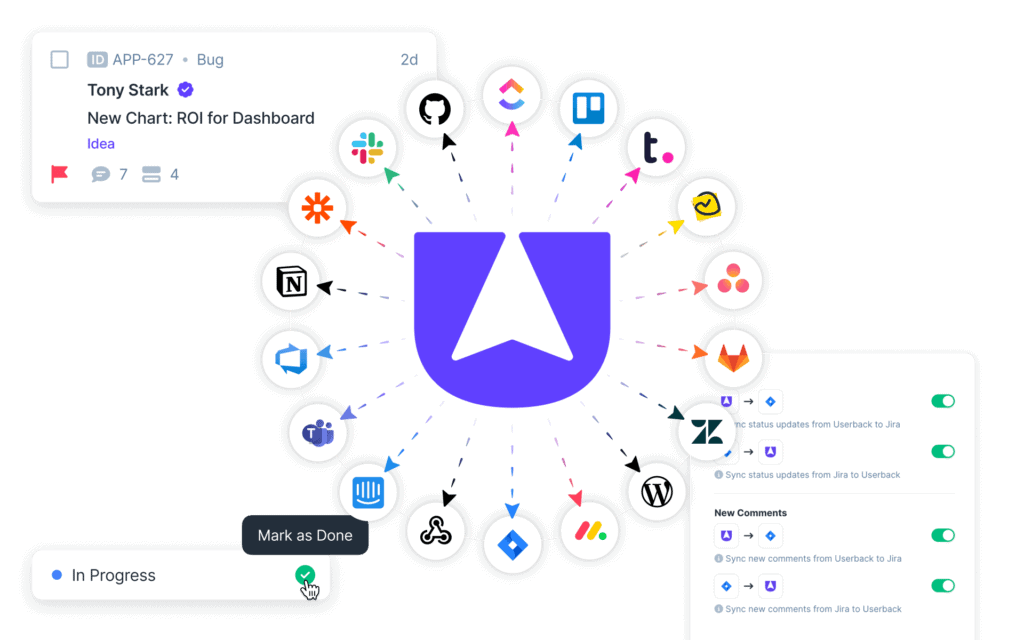
What makes Userback one of the best website testing tools is how seamlessly it fits into your team’s workflow. Feedback can be automatically categorized, prioritized, and even synced with tools like Jira and GitHub, ensuring nothing slips through the cracks. Developers can easily filter feedback by tags, status, or type to stay focused on what matters most. Whether you’re catching front-end bugs, testing new features, or fine-tuning the user experience, Userback provides a clear, actionable view of what real users are experiencing—so you can build better products, faster.



Final Words on Website Application Testing Tools
As we navigate the ever-evolving landscape of website or web application development, utilizing the right testing tools is more crucial than ever. The ability to seamlessly integrate user feedback through platforms like Userback not only accelerates the bug-fixing process but also ensures a superior user experience by addressing real-world usability issues. By leveraging these tools, developers and testers can stay ahead of potential problems, significantly reducing time-to-market and enhancing the overall quality of the applications.
🚀 Start free with Userback today and streamline your web application testing with real-time user feedback.